Review Comments (0) Screenshots (1) Questions & Answers (0) Votes (2) Awards (13) Wiki  
-Please log in to rate
3 3/5 (2)
-AB Software
-4.4.3.5
- www.hmonitor.com
-Shareware
- 1 580 person
Download Hardware sensors...

1.13 MBDownloaded 688 times


Review

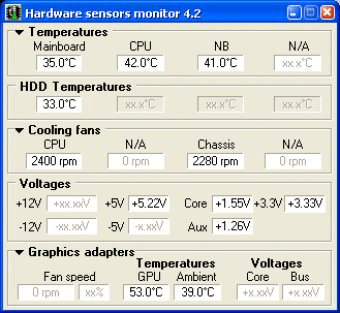
Hardware sensors monitor utilizes sensor chips on smart motherboards to track
system and CPU temperatures, voltages and cooling fans.
Also, program monitors most graphics cards GPU temperature and HDDs S.M.A.R.T. attributes.
By quickly catching an overheated computer, you can prevent disasters such
as system instability or damage. The program is resource friendly, resides
quietly in the system tray, and continually monitors the various parameters. By clicking
its icon, you'll view real time values for each component.
Once it has detected an overheating state, Hmonitor can perform a number of tasks.
First, it can sound an audio alarm, then shut down the system or optionally execute any
selected application (i.e. sending E-mail alert messages to system administrator).
It can also log information to a file on your hard drive.
From the settings dialog, Hmonitor enables you to set "yellow zone" and "red
zone" temperatures for the motherboard and CPU. You can also set minimum fan RPM
before a warning is issued. In addition, nominal values and thresholds can be adjusted
for voltage parameters.

Screenshots

Main Window Main Window

Latest comments


There are no comments, be the first one!
Add new comment
Tag cloud
Download siClient

Email Address:

Password:

Register now »

Forgot password?

Copyright © 2009, Informer Technologies, Inc. About| Privacy and terms| Help| Feedback